

Substack's New Scheduling Feature is Here. But it Won't Fix Data-Driven Growth.
And the tool that actually moves the needle

Hey, wise adventurer,
If you’re not using Substack Notes, you’re not just missing out on growth — you’re leaving money on the table.
Let me be direct with you because I care about your success.
Substack Notes is the #1 growth driver on this platform. It’s where new readers discover you, where conversations happen, and even where paid subscriptions are born. Writers who use Notes consistently report their subscriber growth accelerating by 30%, 50%, 100 % or even more within a few months.
Yet most writers over 50 I talk to either:
Don’t use Notes at all
Don’t track what works
Post sporadically without a strategy
If that's you, here's the truth: you don't need to be a tech expert to make Notes work for you. And once you see the data, it clicks into place.
Every week you don’t engage with Notes is a week your newsletter works harder while your audience stays smaller.
In this newsletter, I will share a tool that uses real data to turn Substack Notes into a predictable growth engine—without the technical overwhelm.

Substack Just Made Notes Easier
Here’s something that will make your life simpler.
Substack just released Notes scheduling — a native feature that lets you plan your Notes in advance without keeping your browser open.
No more “I’ll post that later” that turns into “oops, I forgot.”
Here’s how it works:
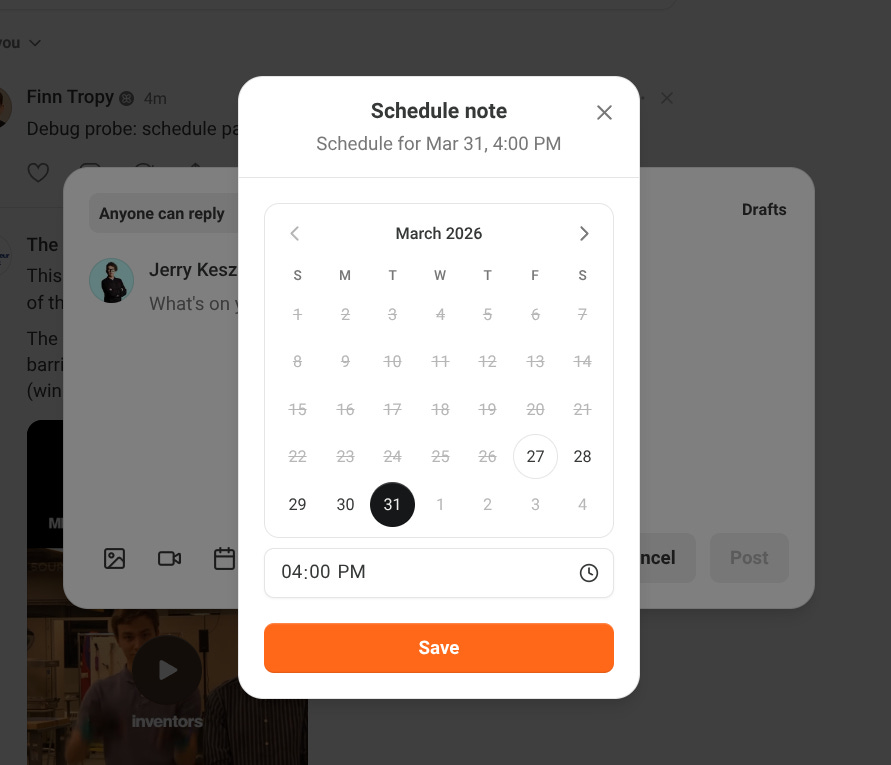
On your computer: Look for the calendar icon at the bottom of the Notes editing window. Click it, pick your date and time, and you’re done.
On your phone: Tap the three dots in the upper-right corner of the Notes editing window. Same process — select when you want it to go live.
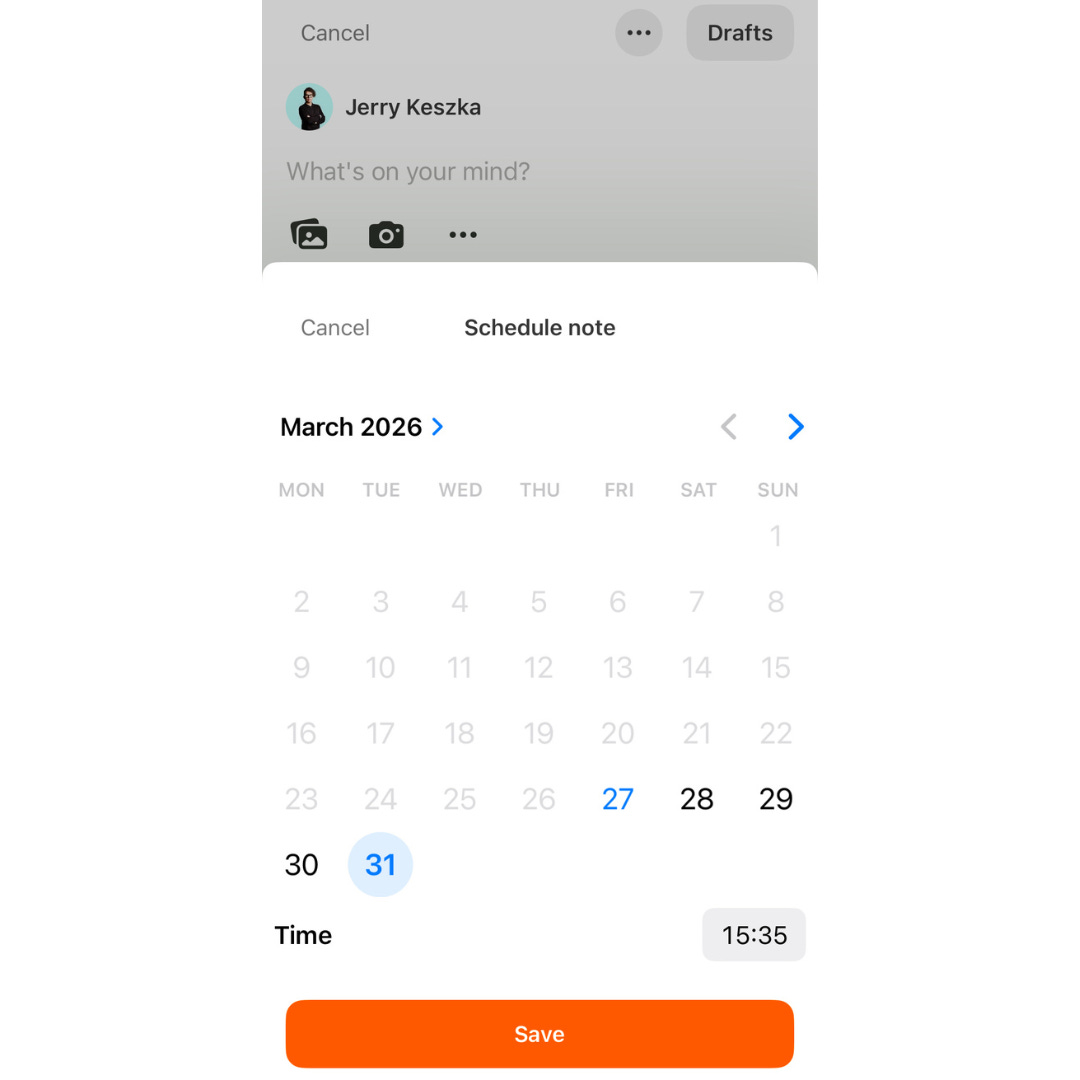
Once scheduled, Substack sends you a confirmation notification. Your Note sits in your drafts until the magic moment.
This is genuinely helpful. If you’ve been avoiding Notes because you dreaded sitting down every day to post, this removes that friction.
So here’s the question: Does this solve everything?
No. And I want to be honest with you about that.
The Scheduling Feature Won’t Change Much (Here’s What Will)
Scheduling is convenient. But convenience without strategy is just organized chaos.
Here’s what scheduling alone doesn’t give you:
✗ Data that’s actually usable — Substack does show stats for each individual Note: likes, restacks, new free subscribers, new paid subscribers. But here’s the catch: you have to click into every single Note separately to see it. If you’ve posted 200 Notes, that’s 200 manual clicks. Nobody has time for that — and without seeing patterns across your entire portfolio, the data is nearly useless.
✗ Insights on timing — When is your audience actually online? What’s the best day to post for YOUR niche? Scheduling doesn’t answer that.
✗ Content optimization guidance — How do you write Notes that actually get attention? What headlines, formats, and topics perform best for your specific audience? Native scheduling offers no help here.
Without this information, you’re guessing. And guessing with your growth is an expensive hobby.
This is exactly why I use and recommend Substack Studio Pro.
It’s a tool built specifically for serious Substack writers who want to treat Notes like a growth engine — not a hobby.
Here’s what Substack Studio Pro gives you:
✅ Complete Portfolio Analytics — See every Note’s performance in one view. Know instantly which Notes are your “Dynamo” winners and which are wasting your time.
✅ Engagement Heatmap — Visual data showing exactly when YOUR audience is most active. No more guessing the best time to post.
✅ Data-Backed Frameworks — Replicate the exact structures and topics that perform best for your audience.
✅ Weekly Grid + Kanban Planning — Plan your entire week’s Notes visually. Drag, drop, organize, and reuse what already worked.
✅ AI Content Assistant — Generate drafts and refine content without switching tools.
I’ve been using it for about 2 months, and the difference in my approach is night and day.
It will help you make a leap from not guessing anymore to building.
The Numbers That Changed Everything for Me
Let me share something personal.
I used to post all my Notes manually.
But when I started using a tool to aggregate all my Notes data in one place, it really opened my eyes.
Not all of your Notes will be a hit. Most of them will simply disappear into the digital abyss. And that’s okay — it’s normal. But here’s what I didn’t realize until I saw the data laid out clearly:
I had posted over 1,500 Notes.
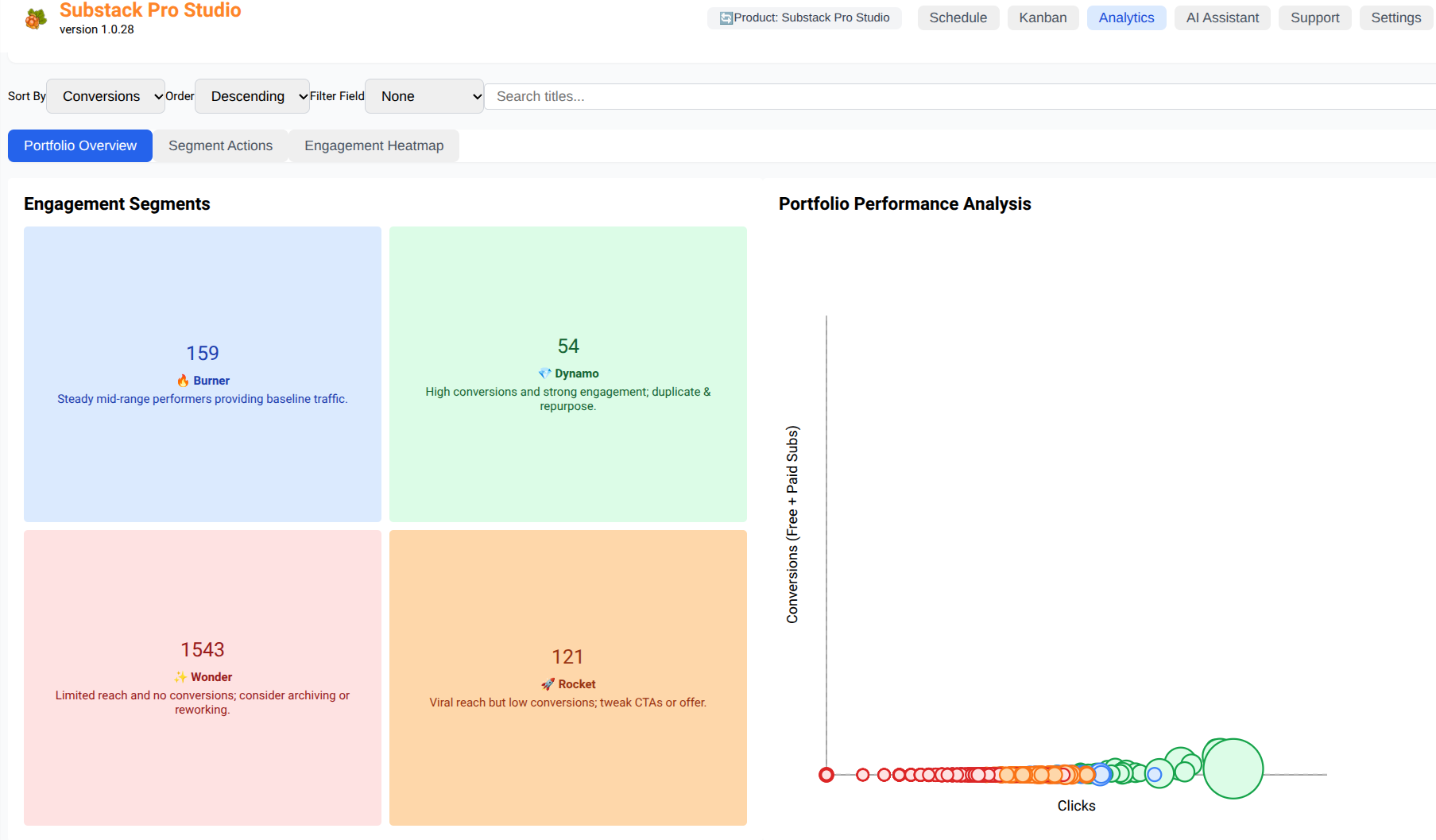
And when I looked at my complete Notes portfolio — every single one visualized — I discovered that only 54 of them were real hits.
That hit me hard.
Not because 54 is a bad number. But because I had been creating content without data-driven proof. I was burning time on topics and formats that went nowhere.
Now? I know exactly what works and what doesn’t. I can see which frameworks, which topics, and which angles brought results. I can reuse the winning patterns without wasting time.
Each bubble in my dashboard represents a specific Note — so I can click on any of them and remember exactly what I wrote. Precise. No guesswork. No scrolling through months of drafts to find “that one that worked.”


This is what the scheduling feature alone cannot give you.
A Quick Reminder: Notes Require Real Engagement
Before I close, I want to mention something important.
Scheduling and data are powerful. But Substack Notes isn’t just a publishing tool — it’s a social platform.
That means posting alone isn’t enough. The writers who grow fastest also:
Like other writers, Notes consistently
Leave thoughtful comments (not just “great post!” — real thoughts)
Occasionally, send direct messages to fellow writers or potential readers
The most successful writers I know follow a simple pattern: 10 likes, 5 comments, 1 direct message per day, at least 5 days per week.
Why? Because Substack rewards engagement. Someone reads your thoughtful comment, clicks your name, discovers your newsletter, and decides to subscribe.
Notes are your engine. But engagement is your fuel.
Your Next Step
If you’ve been hesitant about Substack Notes, I get it. New platforms feel overwhelming, especially when you’re juggling everything else.
But here’s what I want you to remember:
You have decades of experience. You have stories, insights, and wisdom that younger writers can’t replicate.
Substack Notes is simply the vehicle. And now, with scheduling built in and tools like Substack Studio Pro to guide you, it’s more accessible than ever.
This week, I challenge you to:
Schedule your first Note using the new feature
Participate in my weekly Notes boost in the chat.
Leave 5 genuine comments on writers you admire
Try Substack Studio Pro — the data it provides will change how you approach content
You didn’t come this far to stay invisible.
The tools are here. The platform is ready. And your audience is waiting for someone with your experience.
Let’s get you seen.
Reply to this email if you have questions about getting started with Notes or any tools I mentioned. I read every message.
P.S.
If you’ve been posting Notes without tracking results, stop and ask yourself: do you know which of your last 20 Notes actually brought new subscribers? If the answer is “I’m not sure,” that’s exactly the problem a good data tool solves.
Rock the world, not the chair.
Found this useful? ♻️ SHARE ♻️ it with friends, colleagues, or anyone ready to turn their expertise into income and build freedom on their own terms.

Disclosure: This post contains affiliate links, meaning I get a commission if you decide to purchase through my links at no additional cost. I only recommend products and services I use and find helpful.
Hi Jerry!! Another great article!! While I ABSOLUTELY, TOTALLY agree, and I’ve followed Finn since he first started with this, here’s my dilemma.
At first you had to leave your computer always on. I only get out my laptop when I have to.
This version of his wonderful product does not require that except, I think, if you’re going to use it for bulk scheduling notes.
I hate trying to dive into new technology. I KNOW I should do this but it makes me literally shake in my, well, flip flops.
That being said, I have to get out my computer tomorrow, so maybe I will give it a try.
I would think that many 60+ers feel similarly. And I consider myself tech savvy.